
by Ace Concierge | Virtual Assistant | Sep 19, 2013 | Time Management
 Time management is always a hot topic as we seem to think we have so little time to effectively manage our days and have some semblance of work life balance. You too want to get more things accomplished while the clock keeps ticking and more tasks seem to pile up.
What can you do? Get a handle on your time, your interruptions and your distractions. Thanks to technology and the digital world, we are always connected and being bombarded with data overload. Crush the chaos. It can take all of the discipline you can muster to tune out the influx of information coming at you. Time can be an elusive mystery when you are in a constant struggle to find more of it, so it is up to you to invest in your time, in your life, in your business. The best thing you can do is learn to manage yourself to better manage your time. “Choice management.”
Determine where you want to be and who you want to be when you grow up and then, start planning.
4 Steps to Effective Time Management
Step One
Release your tie to your inbox.
It seems so simple, yet as soon as a notification pops up, off we go. Let’s see what came in. Every email does not need to create a sense of urgency. By continually monitoring your Smartphone and inbox, you generate a stop/start cycle in your work. It distracts you from your most current focus. You can let it go. Schedule specific times during the day to read emails. You can create an autoresponder letting your senders know the times you will be checking your email. You can also apply this to your phone, text messages and other IMs. Each time you stop to read a new message, you not only interrupt your work flow and concentration, but you tack on more time to complete a project, thereby decreasing your efficiency and productivity.
You must manage your Blackberry; do not let it manage you. Many executives check their smartphones throughout meetings and during off-hours. This is not good for concentration, and has a negative impact on decision making. Use it only in bursts: check emails for an hour or so and then put it away so you can focus on the task at hand. Richard Branson
Step Two
Have a plan!! A blueprint for success
Your outline or goal sheet will help to give you a roadmap to accomplish your objectives. When you don’t create a plan or at least a daily To Do list at minimum, your days are spent “willy nilly,” putting out fires, managing what you can remember, they daily influx of projects or the To Dos that are most current. You need a clear direction and plan, outlining your short term and long term goals for success enabling you to prioritize your tasks, projects and desired outcomes. You don’t want to wander aimlessly and miss an important oasis.
Prioritizing is the root of all small business evil. You must take the time to sit down and prioritize your day. Ideally before you leave the office, have a list written for the next day. Once you have a priority of daily tasks being organized becomes easy. Steve Freeman
Step Three
Tomorrow never comes! Tackle it now.
Procrastination is a killer of all things; don’t be fooled by putting something off until you feel like it or think there is a better time to finish up. The time is now, not later. Does your procrastination resemble a little fun on Pinterest, trolling Facebook profiles and your news feed or other types of busy work? Well, just stop right now and realize what you aren’t accomplishing. You are setting yourself up for doom and gloom because when you take the time to review your completed list, nothing got done or was only half managed. Set a To Do timer and commit to it. Forget the non-essentials, your time robbers and FOCUS!! Know what is important and why. Make your list with action steps and stick to it. Create task reminders. Use whatever system works for you, but use a system.
Step Four
Organize!
Organization enhances your time management and productivity. If you have to consistently search for documents,you are wasting your valuable time. File documents, emails, bookmark websites, make lists of your logins and remember everything has a place so keep it there. The more time you spend searching for things, the more time you lose.
You can learn to be more efficient in your time management which will in turn fire up your productivity.
What steps will you institute today?

by Ace Concierge | Virtual Assistant | Aug 27, 2013 | Productivity
 Buried under a mire of paperwork, To Do lists, daily administrative tasks and long range projects can be the crazed life of any entrepreneur. Just how much can one person successfully and effectively manage?
In thinking about all of the various hats you toss in the ring every day, which one is the most important?
- Marketer?
- Sales Rep?
- Bookkeeper?
- Social Media Manager?
- Receptionist?
- Travel Agent?
- Content Curator?
- Graphic Designer?
- IT?
- Event Planner?
- Customer Liaison?
This list is short and probably doesn’t even come close to fully accessorizing your head. While we love colors and fashion, the constant switching on and off of duties is counterproductive, wastes your valuable time and doesn’t represent your core genius. They are the low payoff activities that are necessary to run your business but do they require YOUR attention?
If you made a list of tasks that are associated with each category, what would your day look like?
Pretty overwhelming I am sure.
Have you considered tracking your day? Keeping a spreadsheet or notebook of EVERYTHING you do on a daily basis to keep your business operating smoothly, generating income, grooming current customers and converting leads? It seems daunting, but it is an exercise to make you more aware of your time and energies spent.
Where should you fully invest your efforts?
Here’s your challenge: test out the concept for 3-5 days and see what is on your list. If you would rather have a little digital help, Rescue Time will show you how you spend your time on the computer. You still may need a pen and pencil or the keyboard, but aren’t you curious where the day goes?
Review and analyze your data. What do you see? Any common themes? Did you miss any deadlines or appointments? Was something only half finished or not really in your expertise? Did you have any time for yourself? Downtime is important to refresh and get clarity but if you are busy flopping hats on your head and watching the clock tick, you forgo some well-deserved leisure.
Consider this: Are you tired and burnout? Is it time to delegate to increase your efficiency and productivity?
You may be facing some roadblocks to delegating but you can easily overcome your objections and learn about the benefits of working with a remote team.
Image credit: profitablegrowth.com
by Ace Concierge | Virtual Assistant | Aug 2, 2013 | Productivity, Time Management
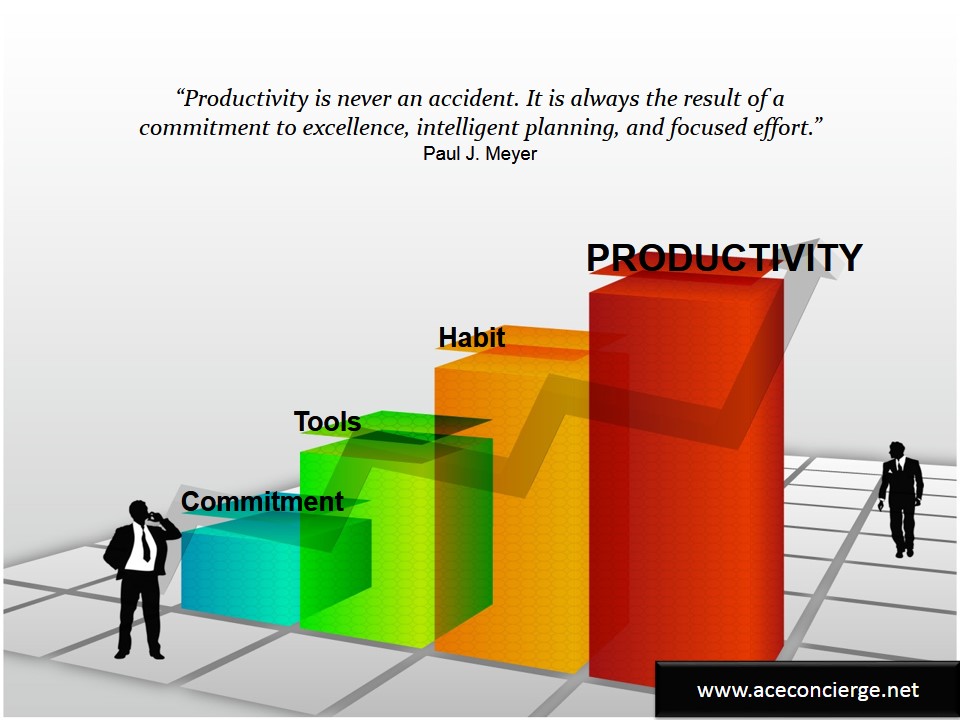
 Are you looking to increase your productivity and efficiency? Maybe get back on track to do more or better manage your time? There are hundreds of articles posted daily and it can be overwhelming to read and/or implement different tools or platforms. You have to find the one that works best for you and use it.
We can read and test with all best intentions but unless we begin to create new habits, committing to a goal, the tool won’t take effect. It is up to you to dedicate your time and energy to learning which one you will apply.
I know I have personally tested a variety of To Do lists, task reminders and project management applications. Some have fallen by the wayside while others have become SOP. I have made these part of my daily routine, for both myself and my clients. Without proper time management and organization, time would be lost and there could be a sense of chaos or overwhelm.
There are many professed gurus suggesting their best methods and time tested tools, but whatever you choose, it must work for you.
- You must want to be more industrious and systematized.
- You must be ready for change.
- You must utilize the application until it becomes second nature.
We search every day, every week for new articles and suggestions and here are few from this week.
6 Secrets Of Super Productive To-Do Lists
3 Threats to Effective Time Blocking and How To Solve Them
How To Manage Your Time
Project Lists: 8 Steps to Crush Your Chaos
The Science of Productivity (video)
Small Business Success Podcast: Time management, Delegation & Empowering Your Core Genius
Time management tips: 5 beliefs that limit productivity
Time Tracking for Productivity
So there you have it: a few tips, tools and commentary to guide you toward a little deeper efficiency.
Can you become a Productivity Maven?

by Ace Concierge | Virtual Assistant | Jun 27, 2013 | Delegation, Small Business, Virtual Assistant
 Yes! I do have one too and I am not sure how I would function without her or the rest of my team. You see, I do practice what I preach. Delegating isn’t just something I recommend for you and your business. I need to do it too.
WHY? Delegating daily tasks and projects enables me to be more productive and efficient. As a solo-preneur, there are only so many hats you can wear before you become overwhelmed and burdened with too many activities on your plate.
Scale for growth: In order to continue a path toward growth, I knew I needed to function at an optimum level. This meant outsourcing to my team enabling me to focus on core tasks that only I can do.
Two Fold Project: I wanted to expand my reach both locally and in my digital universe. In my daily content curation for my client base, I discovered a few articles about RSS feed directories and local online listings. I forwarded these to my trusted virtual assistant, including a few questions, wanting additional research, a compilation of the top sites for each and I also included the approximate time to be spent on each action step.
After a few clarifying e-mails, we had formulated a plan of action. I soon received a list of directories for both queries for approval along with some well thought out details and suggestions.
Results: I am now listed on several RSS feed directories who pull my blog posts while others require manual submission. The local directories have all been updated with my business information and links. Today, I received a spreadsheet containing all of the data, logins and submissions.
“That was easy.”
I can’t tell you how excited I was to have this time consuming project moved off my plate, giving me the time to manage other client business needs as well as other Ace projects.
Outsourcing gives me such great benefits beyond just time. I know I have a team to collaborate and brainstorm ideas. There is accountability. We meet virtually as needed and fully utilize a variety of tools to enhance communications and project management.
Feel the freedom and partner with a virtual assistant. I do.
by Ace Concierge | Virtual Assistant | Jun 12, 2013 | Small Business, Time Management
 How many hours do you spend online checking email, reading posts, searching for information, checking sports scores, reviewing competitors, tweeting, sharing content or setting up reminders? These activities are necessary but also very time consuming and at points, a distraction away from business. What if there was a simple tool to help you automate some of this work, have it delivered to your communication channel of choice and was at no cost to you?
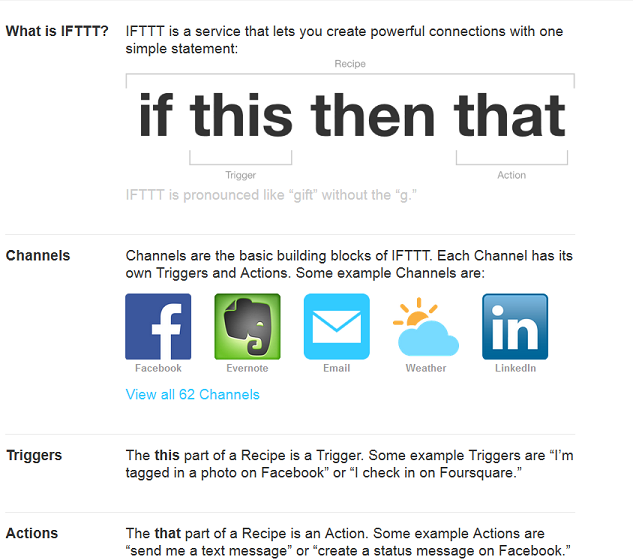
Launched in 2010, “If This, Then That” is FREE service that allows users to connect 62 different channels with “recipes” to help optimize your business, your life and your content. You create triggers “if this” happens “then that” which is the action, pushes the data to your desired channel.
Sample recipes:
- Push RSS feeds to Twitter, Facebook, LinkedIn or Buffer
- Receive a text message, email or phone call when a particular hashtag is posted
- Have Facebook or Instagram images sent to Dropbox
- Receive a text message if there is a forecast for rain
- Star a Gmail and have it delivered to Evernote
- Add Foursquare check-in history to Google Calendar
- Receive a text message for new Gmail notifications
- Send email attachments to Dropbox
- Send an email to IFTTT to call your phone if it is missing
- Automatically create a Twitter list of new followers to review at a later date
- Twitter keyword search to your email
- Schedule tweets using Google calendar
- Have ESPN sports scores and breaking news delivered to your inbox
As you can see, the possibilities are almost limitless. By creating your recipes, you will save time and be a little more productive and organized. It is one of my favorite tools, simplifying content curation and automating a few of my daily projects.
“Time is really the only capital that any human being has, and the only thing he can’t afford to lose.’” – Thomas Edison
How do you use IFTTT?
Image credit: IFTTT