
by Ace Concierge | Virtual Assistant | Mar 27, 2013 | Delegation, Guest Blogger, Virtual Assistant
 Have you ever watched popcorn pop?
It appears to be doing nothing and suddenly a loud burst and a hard kernel turns white and fluffy and jumps into the air! Then others begin to follow and the bursts become more frequent. Then the popping gets faster and louder and suddenly you have gone from a handful of kernals to a bowl of popcorn!
My brain works la lot like a popcorn popper. I can be in meetings, in the middle of conversations, reading, watching television or sound asleep and suddenly it as if someone has turned up the heat and the ideas start popping. …Fun but hard to follow – sometimes even for me!
Many times in my life I’ve sat in meetings and had so much popcorn flying around in my brain that it was hard to sort out and articulate it in a way that others could follow. (It can also be hard to listen to others with all of the popcorn flying around!)
Over-time I learned that in order for those kernels to mean anything to anyone else, I need to create bite-sized popcorn balls before I shared them.
• For me that means pulling those kernels from my brain and writing them down.
• Then thinking through what is there and sometimes just letting it sit for awhile.
• It means researching and reading, and listening, thinking and then “balling” the perfect kernels.
• Doing all of that takes time.
• But it helps me turn mountains of data and stories into something meaningful.
• In that process I learn and grow and am better equipped to help others.
As a small business owner I’ve learned that spending my time in that space is one of the most important things I can do. And as a result I’ve decided to hire a Virtual Assistant so that I can stay focused on listening, learning, sorting and “balling”!
Shortly after I made that decision, I read this article about Einstein. Wow! What a powerful way to reinforce that decision!
So tell me: In your position what should you spend more time on?
Guest post via:
Chery Gegelman, President
Giana Consulting LLC
Chery helps individuals and organizations seek truth, connect dots, solve problems and amplify their potential. She is a co-author of the Lead Change book “The Character-Based Leader.”
by Ace Concierge | Virtual Assistant | Mar 2, 2013 | Executive Administration, Time Management
 I was forced into a little work life balance yesterday when the charger port on my laptop decided to malfunction. After about 15 minutes of power cord twisting, manipulation and tape, I was able to create the perfect placement for charging. I am not able to move the laptop out of fear of losing the all important power plug tweak; so there it sits on the floor until further notice.
Thanks to continual time management, scheduling and beginning the work day at 6 AM, all vital projects had been managed. Organizational and productivity skills are a life saver. This daily preparation and task management saved me many headaches and hair pulling while my laptop was in a prone position for getting juiced back up.
After doing some initial research, Friday evening was my night to choose a laptop and I wasn’t coming home empty handed. What I wasn’t aware of was that EVERY computer comes with Windows 8. I had only heard nightmares and a variety of complaints – I was up for the challenge with the learning curve: up until 3:30 AM that is!! I woke at 6, hit snooze until 7 AM and have been here almost all day/night configuring, transferring files, working, screaming, swearing and finding my place with Windows 8 and a new laptop.
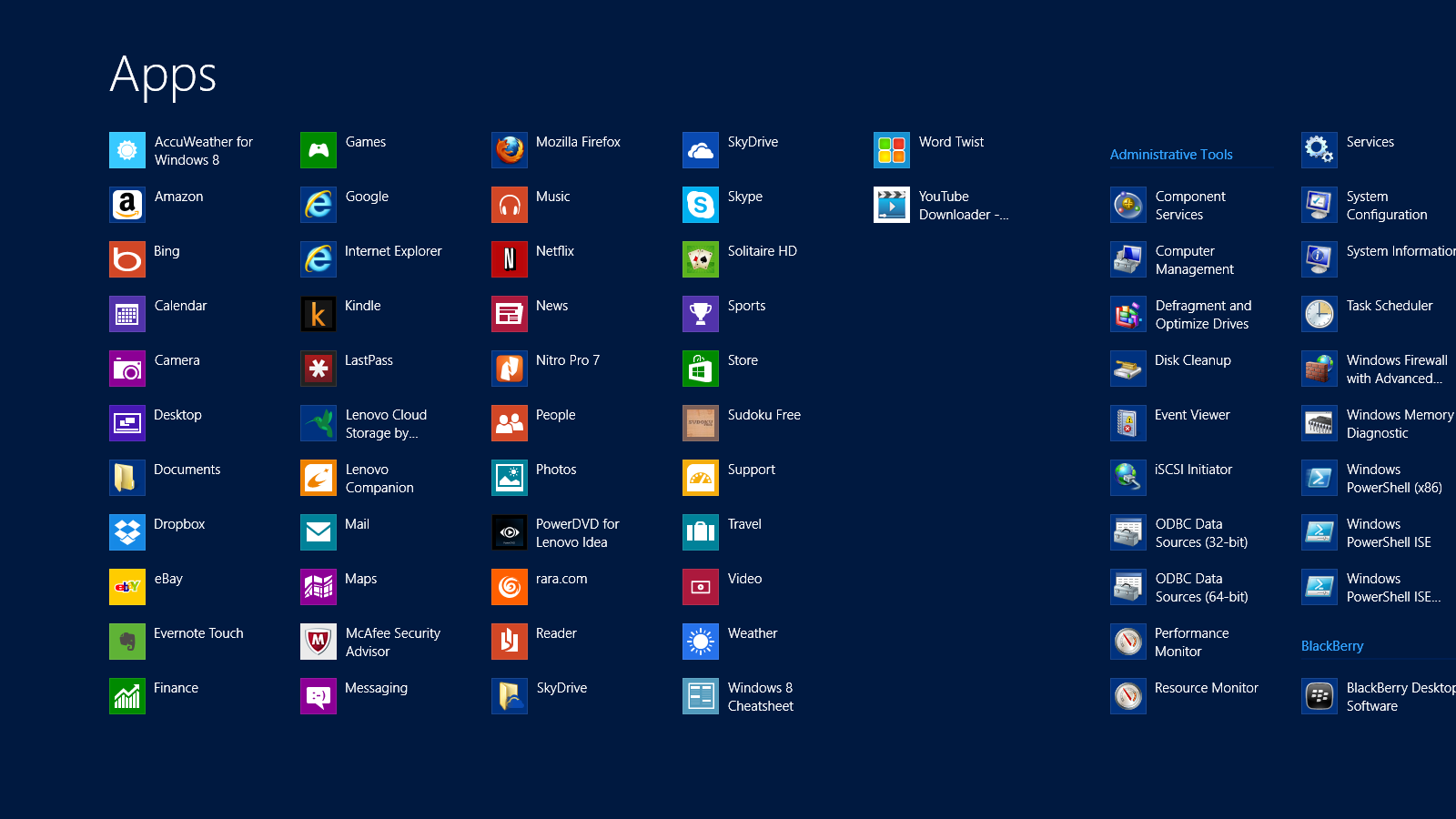
Windows 8 Shortcuts | APPS
I was delighted to find SHORTCUTS amongst their APPS, making my life just a little easier. While I continue to hit a few roadblocks OR maybe five, I am jumping the hurdles. I have read them, practiced them and of course forgotten many and I would like to share the FREE PDF I made of Windows 8 Shortcuts to help us all. Something else that has eased the transition a bit were the tips from the previous post on Keyboard Shortcuts. They have come in handy, especially with developing a comfort level with a new keyboard and touchscreen.
What tips or tricks can you share about Windows 8?

by Ace Concierge | Virtual Assistant | Mar 1, 2013 | Time Management, Virtual Assistant, Word Processing
Save time and enhance productivity with keyboard shortcuts
If you are like most entrepreneurs or solo-business owners you are always looking for ways to save time and learning a few keyboard shortcuts could be one of your time management tools. Reducing the amount of keystrokes and mouse clicks can add up to enhance your productivity and the are also easier than using your mouse especially when you are at the computer for extended hours. You may be surprised at how much time you lose because you are not using keyboard shortcuts. There are shortcuts for almost every action or application, even in GMail you can shave time. As a Virtual Assistant who lives on the computer in the digital world, saving time or creating time is essential for my productivity.
“Studies have found that moving your hand back and forth from the mouse to the keyboard is not only time consuming, it interrupts your typing rhythm – making you far less efficient, and leading to frustration (and mistakes!) when you have to constantly readjust hand placement.” Shortcut Library
Think about the multitude of actions it takes to highlight and copy text:
- Interrupt your typing workflow to grab the mouse
- Position your cursor
- Highlight
- Click copy
- Reposition
- Click again
Wouldn’t Ctrl + C and then V be so much simpler? One of my personal favorites is Alt + Tab to move between open windows. Here are just a few of the keyboard shortcuts (from Small Business Trends) we have compiled and there are many. If you would like the full PDF version, please email: info at aceconcierge dot net.
Keyboard Shortcuts | Productivity Enhancers
ESC – Current main function is to interrupt or cancel current process and/or program. (pressing Esc on websites that use jQuery to display photos is quicker than trying to click on the little ‘x’ in the top right hand corner.)
TAB – used to tab across the screen to the next tab stop. Provides a uniform/neat indentation.
SHIFT – shifts other keys into another mode. e.g. make letters capitals, use symbols above numbers
CTRL – performs special operations in conjunction with other keys.
Ctrl+A = Selects ALL texts/objects
Ctrl+B = Highlights all text in bold
Ctrl+C = Copies selected text/other object
Ctrl+V = Pastes text/image that has been copied
Ctrl+S = Saves document/file
Ctrl+Z = Undo previous action
Ctrl+Y = Redo any “Ctrl+Z” action
ALT – a modifier, this key alternates the functions of other pressed keys
Alt+F = Opens ‘file’ menu in an open program
Alt+F4 = Closes the open program
Alt+Spacebar = Opens the window menu of an opened program
Alt+Tab = Switches between open programs, from L to R
Alt+Shift+Tab = Will reverse the order of switching programs
Interacting with Text
Select text >> Press Shift+Right Arrow, Left Arrow, Up Arrow, or Down Arrow to highlight text
Ctrl+Shift+Arrow Keys do the same thing but more quickly, since the cursor is moving per new word now instead of per character
Shift+End to select the end of the line
Ctrl+C to copy selected text to the ‘clipboard’
Ctrl+X to cut selected text
Ctrl+V to paste copied text from the ‘clipboard’
Ctrl+Z to undo an action
Ctrl+Y to redo an action
Ctrl+Right Arrow (Move the insertion point to the beginning of the next word)
Ctrl+Left Arrow (Move the insertion point to the beginning of the previous word)
Ctrl+Down Arrow (Move the insertion point to the beginning of the next paragraph)
Ctrl+Up Arrow (Move the insertion point to the beginning of the previous paragraph)
Ctrl+A (Select all)
Ctrl+Delete (Delete the rest of the word, or entire word if cursor is placed at beginning)
Keep in mind that this is just the shortlist of keyboard shortcuts! How many have you mastered?

by Ace Concierge | Virtual Assistant | Feb 17, 2013 | Small Business, Social Media
 Listening in on the digital chatter is essential to your social media success and company expansion. You need to know about your industry, brand, competitors and trending topics but where do you start? There are hundreds of tools to help you to listen more, engage on a deeper level, troubleshoot, follow trends that influence your business, identify prospects, increase your ROI and to develop your network, all enabling you to grow your business and manage your online reputation as a thought leader.
Creating your online brand and reputation requires active listening, not just pushing content. The variety of platforms is exhaustive so choose a few, set up keyword alerts and monitor the content and voice in your stream. Test drive some of the FREE tools listed below to begin listening and analyzing your social media marketing efforts.
Develop your goals and strategy with a few tips in “Social Media Monitoring: Horton Hears a Whos”
Here is a great infographic about social media monitoring tools. If you scroll to the bottom of the image, you will see many of the ones mentioned in this post.
FREE Social Media Monitoring Tools
Bottlenose Real-time social intelligence engine searching social media with up to the minute news
Engag.io Monitor and engage in your online conversations on one platform. “Your Inbox for Online Conversations and Relationships.”
FollowerWonk Find, analyze and optimize your Twitter following
Google Alerts Receive email alerts based upon your keywords
Google Reader Harvest relevant content, RSS feeds, blog posts and websites
Guzzle Topic based news aggregator monitoring hundreds of feeds
Monitter Twitter real time keyword search
Social Mention Monitors 100 + social media sites bringing you all social media results relevant to your search query (keywords)
Topsy Search and analyze the social web
Twazzup Real time Twitter search engine
TweetLevel Keyword search, analyze and engage: Identify top Twitter influencers, real time keyword and hashtag insight, company buzz
Twtrland Visualizes social footprints; use keywords, hashtags @ name
Twubs Search industry and trending hashtags
Uvrx Social search using keywords, hashtags, names, brands
WhosTalking Social Media search tool, combining data taken from over 60 of the internet’s most popular social media gateways
Your turn: what are some of your favorite tools or suggestions?

by Ace Concierge | Virtual Assistant | Jan 10, 2013 | Delegation, Entrepreneur, Virtual Assistant

Now I know you are not living in the dark ages and have read all of the recent articles regarding the prominence of content marketing. as an essential component of your marketing mix. It helps to build awareness, visibility, trust, branding, lead conversion, digital bandwidth and your reputation as a thought leader. Content marketing is delivering relevant and valuable content to your customers and prospects without selling.
In Social Media Examiner’s article, 8 Content Marketing Trends for B2B, they reviewed a recent study of 1,416 B2B marketers to learn how they leveraged content marketing in 2012, as well as the future prospects for 2013. “In 2012, 64% of marketers said that producing enough content was their number one challenge. More than half of the B2B marketers said that they plan to increase their budgets for 2013.”
This is ALL important data! Your customers and prospects are searching for relevant data to help them in their buying decisions. You want to be that driver. You want to stay one step ahead of your competition, even industry colleagues, but to do this, you must be distributing value. Meeting pain points. Making sure your content conveys the information your audience is chasing.
John Jantsch of Duct Tape Marketing created a “Total Content System™” approach which allows you to “plan, delegate, curate, create, collaborate, repurpose and generally get far more out of every piece of content you produce.” If you would like to listen to his instructional podcast click here. His system revolves around creating a monthly list of content themes, choosing your delivery platforms, and then, integrating it with your business goals.
Picture this, you must
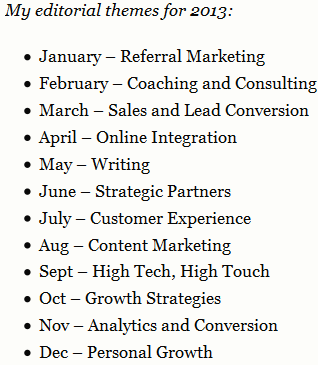
- Duct Tape Marketing Content Calendar
1. Create a content calendar (this is John’s example ) The Experience Farm offers you a FREE 2013 Editorial Calendar
2. Choose your delivery platforms. This could be social media, podcasts, webinars, e-newsletters, hardcopy, guest blog posts, ebooks, online newspapers, chat forums or any venues where your audience lives. John lists at least 10 platforms where he will deliver his content to reach his target market.
3. The last step is to integrate your monthly themes and delivery platforms with your company goals
“When you know what your theme is this month and next month all of a sudden books, tools, articles and conversations take on new meaning and seem to somehow organize themselves for the benefit of your ongoing, long-term approach.” John Jantsch
At this point, let’s review your already busy day, full of appointments, business development, revenue generation, client appreciation, troubleshooting, maybe speaking engagements and all the rest of your core competencies. How many other tasks and projects do you manage that represent other low payoff activities that would be better outsourced?
My direction here? You are well aware of the significance of content marketing for your 2013 business growth and exceeding last year’s goals. Correct? So what is next?
The drumroll please!! As an entrepreneur, I certainly understand your excessive use of company hats and believe me, it gets heavy. I wear too many myself, but I will share with you that I too have been outsourcing to my team of Virtual Assistants. I cannot and do not want to do it all myself. If I want to continually expand my business, then I must delegate and so must you.
“The first rule of management is delegation. Don’t try and do everything yourself because you can’t.” Anthea Turner
Maximize your potential. Focus on your core genius and let Ace Concierge manage the rest. We are not just here for your “one off” tasks and projects. Consider us your vested partner.
Let’s get your content marketing plan in place and kick off this year with a plan and a bang.