
by Ace Concierge | Virtual Assistant | May 21, 2013 | Time Management
 So you have read it is a myth. Well, it is in a way. You can’t manage your time but you can learn to better manage yourself. “Time management” takes discipline and commitment.
There are many hindrances to time management but they are all relate back to how we regulate our lives and productivity levels.
Things that hinder your time management
- Procrastination: when you consistently put off tasks, you end up in a time crunch and can miss deadlines or leave things undone.
- Distractions: take you away from the project, cuts into your time, diminishes focus
- Disorganization: misplace, misfile or lose things and you must waste time searching.
- Lack of focus: jumping around between tasks/projects decreases productivity and output; hence spending more needless time going back to find and finish what you started
- Saving EVERYTHING: when your inbox and folders are overstuffed, you spend more time searching for documents and emails. This inefficiency wastes your time
- Data overload: you have a constant barrage of emails, text messages, IMs and news pouring into your inbox. When you have a new notification, do you automatically STOP what you are doing, click, read, close? This takes up time, removes your focus and interrupts your work flow.
“You can manage the information and the interruptions, because the problem doesn’t lie in the amount of information and interruptions. The problem lies with your methods of processing that information and handling the interruptions.”
Time Fix – Get Organized
By organizing, prioritizing and eliminating distractions, you will save time and enhance your productivity.
- Create schedules
- Time block your day
- Organize your data
- Develop a routine
- Set boundaries
- Use your calendar for appointments and To Dos
- Use action steps for items on your To Do list
- Keep your workspace orderly
- Check email at specific intervals
- Delegate
- Put down your Smartphone
- Turn off the television
These are just a few simple tips to better manage yourself which will in turn help you to better manage your time. You will feel more systematized and industrious. Can you imagine how much more you will be able to accomplish in your day? With 168 hours in the week, you truly can achieve great things.
Are you ready to be the master of your time??
Image credit: Microsoft

by Ace Concierge | Virtual Assistant | May 4, 2013 | Entrepreneur, Time Management
 We all have goals and things we want to achieve but are you really ready to commit? To produce an impact? Can you make the pledge to maintain forward momentum and accomplish your objectives? Saying and doing are two completely opposite entities. Action begets action.
“Action and reaction, ebb and flow, trial and error, change – this is the rhythm of living. Out of our over-confidence, fear; out of our fear, clearer vision, fresh hope. And out of hope, progress.” Bruce Barton
Sure, we often THINK about the changes we want to institute, the direction we see ourselves working toward, but those are merely thoughts. It is time to step up and confront what is blocking our realizations for growth.
- Squander our time and efforts on needless busy work
- Lose ourselves in the abyss of posting and trolling social media
- Become sidetracked with tedious, nonsense task
- Lose focus
- Decide we just don’t feel like it
- Work IN our business instead of ON it
- We are undeserving
- Expecting other company partners to contribute more
- Afraid of success
- Waiting for bigger and better opportunities
The only way to facilitate change is to learn to become more effective and efficient.
To transform.
To revolutionize our thought process and actions.
Keep a daily log of time and projects, the interruptions, personal ambushes and at the end of the week, scrutinize what you truly accomplished. How you spent your time? What was wasted and where can you improve your focus and time management?
 A recent post on Stepcase Lifehack, 3 Ways to Be Less Busy and More Productive, state: “How often do you actually achieve results while you are busy? Not too often, I bet. Switch your focus from being busy to being productive, so that you can accomplish more, see tangible results, and have time for fun.” They offered some very helpful hints to fine tune and remove the busy from your life.
“Action springs not from thought, but from a readiness for responsibility.” Dietrich Bonhoeffer
Many become defensive when their aspect of busy is challenged and that is understandable, but in terms of accomplishable goals, growth, momentum and successes, busy and productive must be further defined to determine if being busy is just wasting time or working toward an end result. Entrepreneurship requires 150% dedication, focus and effort. It is not a part time endeavor to embark upon while meandering through life. If you are choosing to operate a business, then you must live and breathe your corporation, from top to bottom, every day.
“Nothing in the world can take the place of persistence. Talent will not; nothing is more common than unsuccessful men with talent. Genius will not; unrewarded genius is almost a proverb. Education will not; the world is full of educated derelicts. Persistence and determination are omnipotent. The slogan ‘press on’ has solved and always will solve the problems of the human race.” Calvin Coolidge
- Know your goals: long term, short term and daily.
- Plan your work and work your plan.
- Create your action steps.
- Eliminate distractions.
- Stay on task.
- Turn off notifications.
- Be consistent with your actions.
- Delegate your non-income producing tasks.
- Learn something new to advance your business.
- Read pertinent books/articles.
- Find a mentor.
- Ask for help.
- Do what it takes to bring your business to the next level.
- Be accountable for each step-each milestone.
- It is up to you
“At the end of the day we are accountable to ourselves – our success is a result of what we do.” Catherine Pulsifer

by Ace Concierge | Virtual Assistant | Apr 16, 2013 | Delegation, Time Management, Virtual Assistant
Image credit: actioncoach.com
As a virtual assistant I try to help educate my clients and prospects on the high value of delegating some of your daily business operations to better leverage your time and your skills. It is a low cost, high payoff activity to maximize your business growth. As entrepreneurs, the amount of hats we must wear can be overwhelming and very time consuming. It is almost impossible to do it all and perform at 100% of our capabilities. We can become worn out, lose track of time, have higher stress levels, become distracted, less focused, inhibit our productivity, have a decreased work life balance, miss deadlines, become backlogged or not complete our To Do lists. These things are not acceptable and will not foster growth and forward movement.
“It’s important to be working on tasks that have the biggest impact on the growth of your business–everything else should be delegated.” Iyla Pozin
I have learned the fine art of delegation as well. I certainly can’t preach the value of outsourcing to my clients if I am not doing it as well. Once I began delegating more of my daily business operations and back end admin tasks, there was a sigh of relief. The “aaahhh” feeling that I knew my team was helping me to be more effective and productive. I am a control freak; however, hand picking my personal virtual assistants gave me the confidence I needed to be able to send them tasks and projects.
Delegating has given me more time to work ON my business rather than IN it. I continually refine and revisit what I will outsource, as there is always room for improvement but if I am going to make suggestions to you, I too must follow the same premise. I have also discovered that the more I read, research, and learn about new tools for you, the more I apply them to my own business. I am grateful that you have chosen Ace as your virtual assistant. It is because of YOU that I too have been able to flourish and become even more productive, which I didn’t think was possible being so OCD about time management and productivity.
“If you are ever going to grow your business beyond what you can contain in the grasp of your outstretched arms, you’ll have to let go of a great deal of what you do to fill each day.” John Jantsch.
What will you delegate today?
by Ace Concierge | Virtual Assistant | Mar 2, 2013 | Executive Administration, Time Management
 I was forced into a little work life balance yesterday when the charger port on my laptop decided to malfunction. After about 15 minutes of power cord twisting, manipulation and tape, I was able to create the perfect placement for charging. I am not able to move the laptop out of fear of losing the all important power plug tweak; so there it sits on the floor until further notice.
Thanks to continual time management, scheduling and beginning the work day at 6 AM, all vital projects had been managed. Organizational and productivity skills are a life saver. This daily preparation and task management saved me many headaches and hair pulling while my laptop was in a prone position for getting juiced back up.
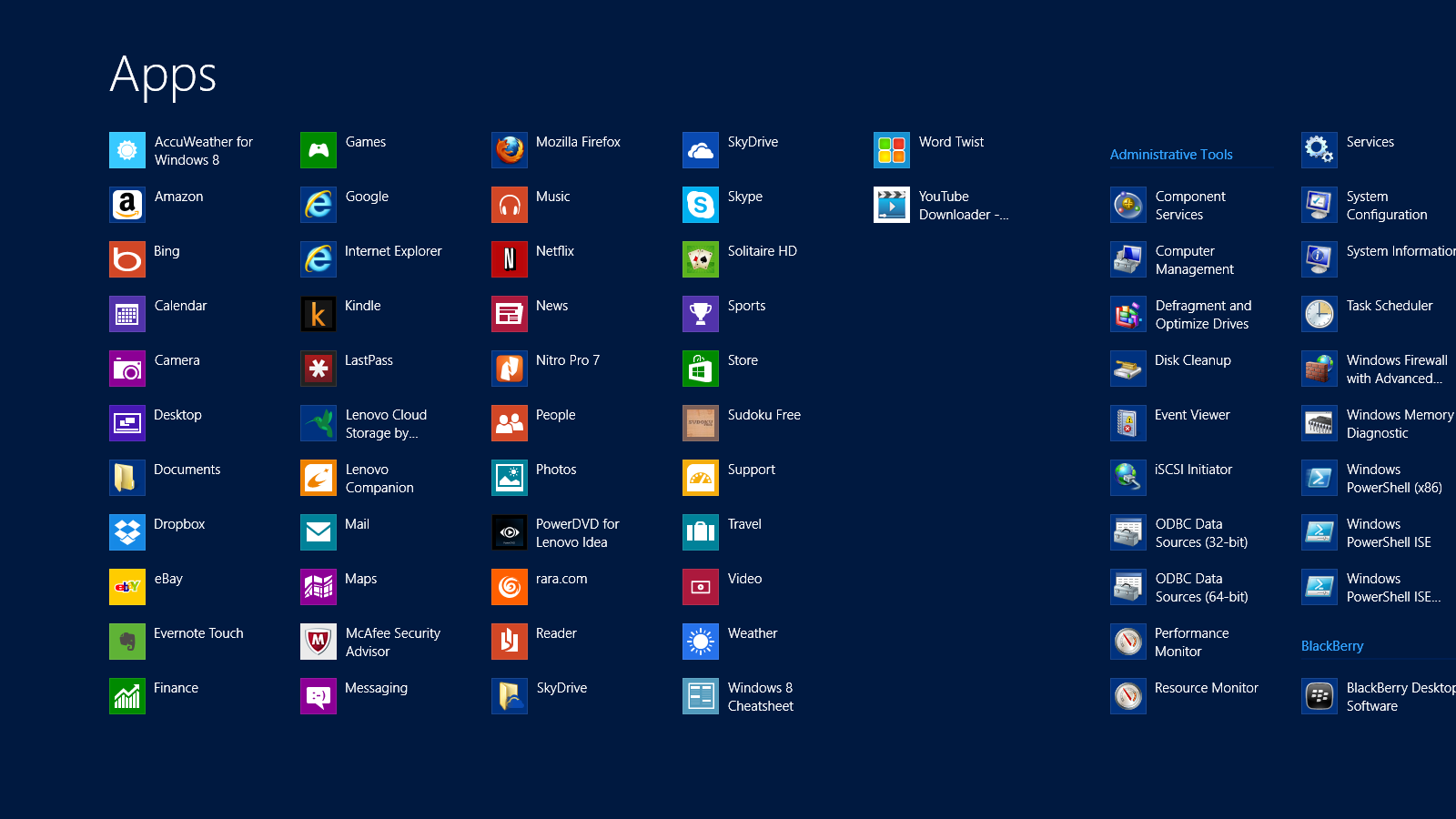
After doing some initial research, Friday evening was my night to choose a laptop and I wasn’t coming home empty handed. What I wasn’t aware of was that EVERY computer comes with Windows 8. I had only heard nightmares and a variety of complaints – I was up for the challenge with the learning curve: up until 3:30 AM that is!! I woke at 6, hit snooze until 7 AM and have been here almost all day/night configuring, transferring files, working, screaming, swearing and finding my place with Windows 8 and a new laptop.
Windows 8 Shortcuts | APPS
I was delighted to find SHORTCUTS amongst their APPS, making my life just a little easier. While I continue to hit a few roadblocks OR maybe five, I am jumping the hurdles. I have read them, practiced them and of course forgotten many and I would like to share the FREE PDF I made of Windows 8 Shortcuts to help us all. Something else that has eased the transition a bit were the tips from the previous post on Keyboard Shortcuts. They have come in handy, especially with developing a comfort level with a new keyboard and touchscreen.
What tips or tricks can you share about Windows 8?

by Ace Concierge | Virtual Assistant | Mar 1, 2013 | Time Management, Virtual Assistant, Word Processing
Save time and enhance productivity with keyboard shortcuts
If you are like most entrepreneurs or solo-business owners you are always looking for ways to save time and learning a few keyboard shortcuts could be one of your time management tools. Reducing the amount of keystrokes and mouse clicks can add up to enhance your productivity and the are also easier than using your mouse especially when you are at the computer for extended hours. You may be surprised at how much time you lose because you are not using keyboard shortcuts. There are shortcuts for almost every action or application, even in GMail you can shave time. As a Virtual Assistant who lives on the computer in the digital world, saving time or creating time is essential for my productivity.
“Studies have found that moving your hand back and forth from the mouse to the keyboard is not only time consuming, it interrupts your typing rhythm – making you far less efficient, and leading to frustration (and mistakes!) when you have to constantly readjust hand placement.” Shortcut Library
Think about the multitude of actions it takes to highlight and copy text:
- Interrupt your typing workflow to grab the mouse
- Position your cursor
- Highlight
- Click copy
- Reposition
- Click again
Wouldn’t Ctrl + C and then V be so much simpler? One of my personal favorites is Alt + Tab to move between open windows. Here are just a few of the keyboard shortcuts (from Small Business Trends) we have compiled and there are many. If you would like the full PDF version, please email: info at aceconcierge dot net.
Keyboard Shortcuts | Productivity Enhancers
ESC – Current main function is to interrupt or cancel current process and/or program. (pressing Esc on websites that use jQuery to display photos is quicker than trying to click on the little ‘x’ in the top right hand corner.)
TAB – used to tab across the screen to the next tab stop. Provides a uniform/neat indentation.
SHIFT – shifts other keys into another mode. e.g. make letters capitals, use symbols above numbers
CTRL – performs special operations in conjunction with other keys.
Ctrl+A = Selects ALL texts/objects
Ctrl+B = Highlights all text in bold
Ctrl+C = Copies selected text/other object
Ctrl+V = Pastes text/image that has been copied
Ctrl+S = Saves document/file
Ctrl+Z = Undo previous action
Ctrl+Y = Redo any “Ctrl+Z” action
ALT – a modifier, this key alternates the functions of other pressed keys
Alt+F = Opens ‘file’ menu in an open program
Alt+F4 = Closes the open program
Alt+Spacebar = Opens the window menu of an opened program
Alt+Tab = Switches between open programs, from L to R
Alt+Shift+Tab = Will reverse the order of switching programs
Interacting with Text
Select text >> Press Shift+Right Arrow, Left Arrow, Up Arrow, or Down Arrow to highlight text
Ctrl+Shift+Arrow Keys do the same thing but more quickly, since the cursor is moving per new word now instead of per character
Shift+End to select the end of the line
Ctrl+C to copy selected text to the ‘clipboard’
Ctrl+X to cut selected text
Ctrl+V to paste copied text from the ‘clipboard’
Ctrl+Z to undo an action
Ctrl+Y to redo an action
Ctrl+Right Arrow (Move the insertion point to the beginning of the next word)
Ctrl+Left Arrow (Move the insertion point to the beginning of the previous word)
Ctrl+Down Arrow (Move the insertion point to the beginning of the next paragraph)
Ctrl+Up Arrow (Move the insertion point to the beginning of the previous paragraph)
Ctrl+A (Select all)
Ctrl+Delete (Delete the rest of the word, or entire word if cursor is placed at beginning)
Keep in mind that this is just the shortlist of keyboard shortcuts! How many have you mastered?
by Ace Concierge | Virtual Assistant | Dec 26, 2012 | Entrepreneur, Time Management
 What impedes your productivity? For many, it can be outside distractions or lack of dedicated focus. Here is a quick exercise to help you learn where you may need to improve.
When you find your mind straying or you wander off task, make a hash mark # on a piece of paper, noting what you were supposed to be doing and how much time you allowed yourself OFF task. At the end of the day, review how many times you were distracted and how many hours you squandered on non-core activities.
What did you fully accomplish or complete? Any work that is not advancing you toward your professional or life goals should not be counted as “work.” These activities account for many wasted hours during your day. Much of the busyness that usurps your time may give you a sense of productivity, but being busy does not mean you are being productive or effectively contributing to your life’s work.
Part of being effective during your work hours is the discipline to spend time on what is truly important even if other things try to steer you off course. During your review of the hash marks, where did you spend most of your time? If you end the day with several half finished projects or other important activities that merely were pushed to the back burner because Facebook, text messages, Twitter or other more “fun” interactions, you may want to re-evaluate your focus and productivity levels.
Efficiency is learning about your awareness to, acceptance of and ability to determine your real work, the actual tasks and projects that propel you forward versus time suckers, bad habits, procrastination or other low payoff activities that take you away from your personal and professional aspirations. It is a continual building process and without a strong sturdy foundation, you may find yourself with a few cracks, leading to disaster, lost time or missed opportunities.
How will you commit to improving your productivity and limiting your distractions?