
by Ace Concierge | Virtual Assistant | Mar 27, 2013 | Delegation, Guest Blogger, Virtual Assistant
 Have you ever watched popcorn pop?
It appears to be doing nothing and suddenly a loud burst and a hard kernel turns white and fluffy and jumps into the air! Then others begin to follow and the bursts become more frequent. Then the popping gets faster and louder and suddenly you have gone from a handful of kernals to a bowl of popcorn!
My brain works la lot like a popcorn popper. I can be in meetings, in the middle of conversations, reading, watching television or sound asleep and suddenly it as if someone has turned up the heat and the ideas start popping. …Fun but hard to follow – sometimes even for me!
Many times in my life I’ve sat in meetings and had so much popcorn flying around in my brain that it was hard to sort out and articulate it in a way that others could follow. (It can also be hard to listen to others with all of the popcorn flying around!)
Over-time I learned that in order for those kernels to mean anything to anyone else, I need to create bite-sized popcorn balls before I shared them.
• For me that means pulling those kernels from my brain and writing them down.
• Then thinking through what is there and sometimes just letting it sit for awhile.
• It means researching and reading, and listening, thinking and then “balling” the perfect kernels.
• Doing all of that takes time.
• But it helps me turn mountains of data and stories into something meaningful.
• In that process I learn and grow and am better equipped to help others.
As a small business owner I’ve learned that spending my time in that space is one of the most important things I can do. And as a result I’ve decided to hire a Virtual Assistant so that I can stay focused on listening, learning, sorting and “balling”!
Shortly after I made that decision, I read this article about Einstein. Wow! What a powerful way to reinforce that decision!
So tell me: In your position what should you spend more time on?
Guest post via:
Chery Gegelman, President
Giana Consulting LLC
Chery helps individuals and organizations seek truth, connect dots, solve problems and amplify their potential. She is a co-author of the Lead Change book “The Character-Based Leader.”
by Ace Concierge | Virtual Assistant | Mar 2, 2013 | Executive Administration, Time Management
 I was forced into a little work life balance yesterday when the charger port on my laptop decided to malfunction. After about 15 minutes of power cord twisting, manipulation and tape, I was able to create the perfect placement for charging. I am not able to move the laptop out of fear of losing the all important power plug tweak; so there it sits on the floor until further notice.
Thanks to continual time management, scheduling and beginning the work day at 6 AM, all vital projects had been managed. Organizational and productivity skills are a life saver. This daily preparation and task management saved me many headaches and hair pulling while my laptop was in a prone position for getting juiced back up.
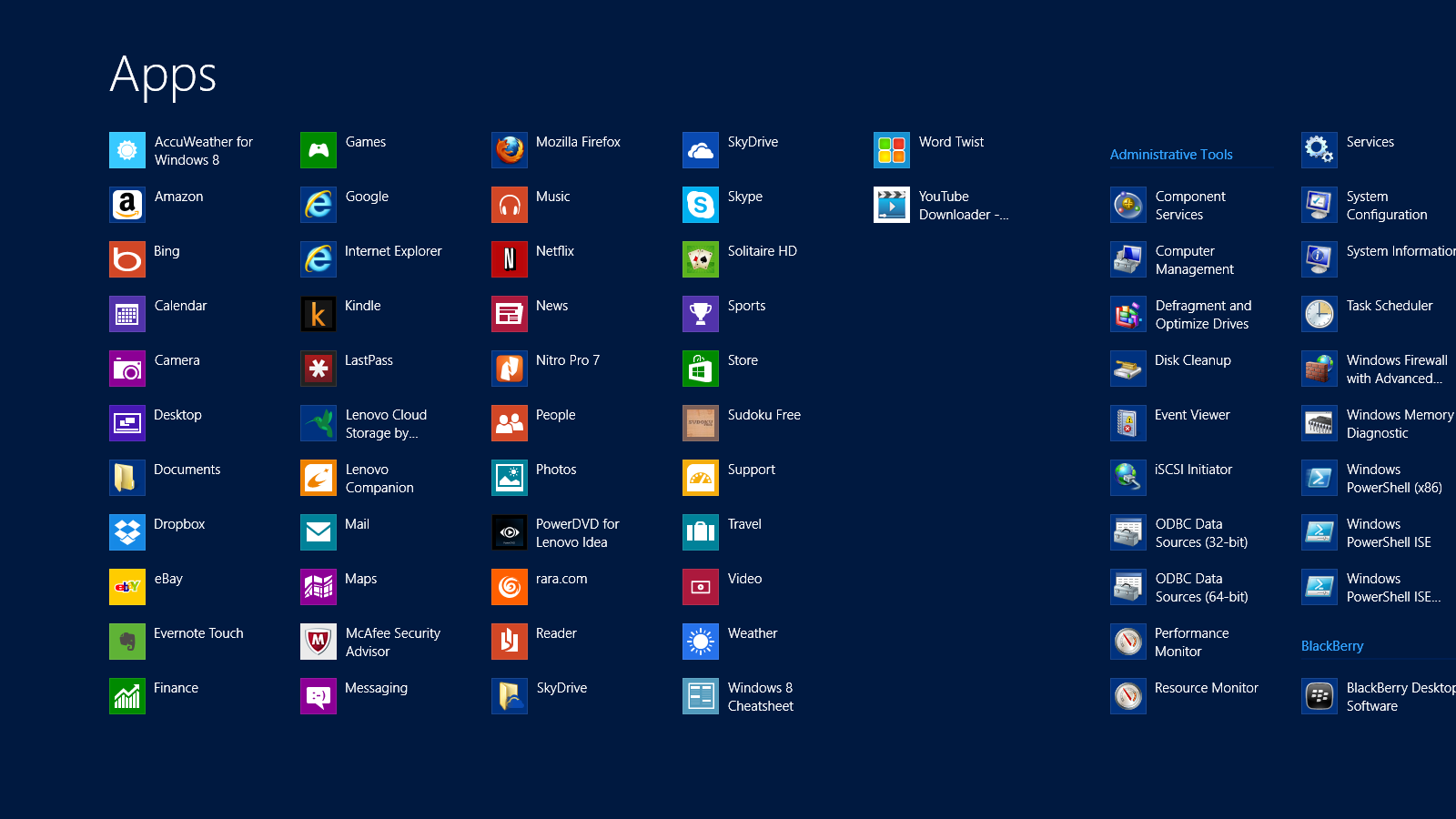
After doing some initial research, Friday evening was my night to choose a laptop and I wasn’t coming home empty handed. What I wasn’t aware of was that EVERY computer comes with Windows 8. I had only heard nightmares and a variety of complaints – I was up for the challenge with the learning curve: up until 3:30 AM that is!! I woke at 6, hit snooze until 7 AM and have been here almost all day/night configuring, transferring files, working, screaming, swearing and finding my place with Windows 8 and a new laptop.
Windows 8 Shortcuts | APPS
I was delighted to find SHORTCUTS amongst their APPS, making my life just a little easier. While I continue to hit a few roadblocks OR maybe five, I am jumping the hurdles. I have read them, practiced them and of course forgotten many and I would like to share the FREE PDF I made of Windows 8 Shortcuts to help us all. Something else that has eased the transition a bit were the tips from the previous post on Keyboard Shortcuts. They have come in handy, especially with developing a comfort level with a new keyboard and touchscreen.
What tips or tricks can you share about Windows 8?

by Ace Concierge | Virtual Assistant | Mar 1, 2013 | Time Management, Virtual Assistant, Word Processing
Save time and enhance productivity with keyboard shortcuts
If you are like most entrepreneurs or solo-business owners you are always looking for ways to save time and learning a few keyboard shortcuts could be one of your time management tools. Reducing the amount of keystrokes and mouse clicks can add up to enhance your productivity and the are also easier than using your mouse especially when you are at the computer for extended hours. You may be surprised at how much time you lose because you are not using keyboard shortcuts. There are shortcuts for almost every action or application, even in GMail you can shave time. As a Virtual Assistant who lives on the computer in the digital world, saving time or creating time is essential for my productivity.
“Studies have found that moving your hand back and forth from the mouse to the keyboard is not only time consuming, it interrupts your typing rhythm – making you far less efficient, and leading to frustration (and mistakes!) when you have to constantly readjust hand placement.” Shortcut Library
Think about the multitude of actions it takes to highlight and copy text:
- Interrupt your typing workflow to grab the mouse
- Position your cursor
- Highlight
- Click copy
- Reposition
- Click again
Wouldn’t Ctrl + C and then V be so much simpler? One of my personal favorites is Alt + Tab to move between open windows. Here are just a few of the keyboard shortcuts (from Small Business Trends) we have compiled and there are many. If you would like the full PDF version, please email: info at aceconcierge dot net.
Keyboard Shortcuts | Productivity Enhancers
ESC – Current main function is to interrupt or cancel current process and/or program. (pressing Esc on websites that use jQuery to display photos is quicker than trying to click on the little ‘x’ in the top right hand corner.)
TAB – used to tab across the screen to the next tab stop. Provides a uniform/neat indentation.
SHIFT – shifts other keys into another mode. e.g. make letters capitals, use symbols above numbers
CTRL – performs special operations in conjunction with other keys.
Ctrl+A = Selects ALL texts/objects
Ctrl+B = Highlights all text in bold
Ctrl+C = Copies selected text/other object
Ctrl+V = Pastes text/image that has been copied
Ctrl+S = Saves document/file
Ctrl+Z = Undo previous action
Ctrl+Y = Redo any “Ctrl+Z” action
ALT – a modifier, this key alternates the functions of other pressed keys
Alt+F = Opens ‘file’ menu in an open program
Alt+F4 = Closes the open program
Alt+Spacebar = Opens the window menu of an opened program
Alt+Tab = Switches between open programs, from L to R
Alt+Shift+Tab = Will reverse the order of switching programs
Interacting with Text
Select text >> Press Shift+Right Arrow, Left Arrow, Up Arrow, or Down Arrow to highlight text
Ctrl+Shift+Arrow Keys do the same thing but more quickly, since the cursor is moving per new word now instead of per character
Shift+End to select the end of the line
Ctrl+C to copy selected text to the ‘clipboard’
Ctrl+X to cut selected text
Ctrl+V to paste copied text from the ‘clipboard’
Ctrl+Z to undo an action
Ctrl+Y to redo an action
Ctrl+Right Arrow (Move the insertion point to the beginning of the next word)
Ctrl+Left Arrow (Move the insertion point to the beginning of the previous word)
Ctrl+Down Arrow (Move the insertion point to the beginning of the next paragraph)
Ctrl+Up Arrow (Move the insertion point to the beginning of the previous paragraph)
Ctrl+A (Select all)
Ctrl+Delete (Delete the rest of the word, or entire word if cursor is placed at beginning)
Keep in mind that this is just the shortlist of keyboard shortcuts! How many have you mastered?

by Ace Concierge | Virtual Assistant | Feb 17, 2013 | Small Business, Social Media
 Listening in on the digital chatter is essential to your social media success and company expansion. You need to know about your industry, brand, competitors and trending topics but where do you start? There are hundreds of tools to help you to listen more, engage on a deeper level, troubleshoot, follow trends that influence your business, identify prospects, increase your ROI and to develop your network, all enabling you to grow your business and manage your online reputation as a thought leader.
Creating your online brand and reputation requires active listening, not just pushing content. The variety of platforms is exhaustive so choose a few, set up keyword alerts and monitor the content and voice in your stream. Test drive some of the FREE tools listed below to begin listening and analyzing your social media marketing efforts.
Develop your goals and strategy with a few tips in “Social Media Monitoring: Horton Hears a Whos”
Here is a great infographic about social media monitoring tools. If you scroll to the bottom of the image, you will see many of the ones mentioned in this post.
FREE Social Media Monitoring Tools
Bottlenose Real-time social intelligence engine searching social media with up to the minute news
Engag.io Monitor and engage in your online conversations on one platform. “Your Inbox for Online Conversations and Relationships.”
FollowerWonk Find, analyze and optimize your Twitter following
Google Alerts Receive email alerts based upon your keywords
Google Reader Harvest relevant content, RSS feeds, blog posts and websites
Guzzle Topic based news aggregator monitoring hundreds of feeds
Monitter Twitter real time keyword search
Social Mention Monitors 100 + social media sites bringing you all social media results relevant to your search query (keywords)
Topsy Search and analyze the social web
Twazzup Real time Twitter search engine
TweetLevel Keyword search, analyze and engage: Identify top Twitter influencers, real time keyword and hashtag insight, company buzz
Twtrland Visualizes social footprints; use keywords, hashtags @ name
Twubs Search industry and trending hashtags
Uvrx Social search using keywords, hashtags, names, brands
WhosTalking Social Media search tool, combining data taken from over 60 of the internet’s most popular social media gateways
Your turn: what are some of your favorite tools or suggestions?

by Ace Concierge | Virtual Assistant | Feb 11, 2013 | Small Business, Social Media
 In today’s ever competitive business climate, social media is not a passing fad or simply a source of amusement for the younger generations. It represents an essential platform as part of your marketing mix. Consumer buyer behavior now reflects their consistent quest for up to the minute information about your company’s products and services. People buy from people and customers prefer the immediacy of the web, the data they can search, the recommendations they find and a community for their voice. You need to not only have an online presence but to be actively listening to your prospects, colleagues, partners, competition and clients.
A recent survey by Deloitte revealed that 60% of consumers are going online more often to locate the best products and services and their decisions are greatly influenced by the tools, information and service they find when they visit websites or perform a search. Brand loyalty and reputation are still based on the quality of the customer experience.
Social media is a vital component to your business, marketing, sales and customer service strategies.
Some companies fear creating a social media presence because they believe that if they do, they may provide their audience with a platform to complain or otherwise post negative feedback. Whether you create your community or not, the “talk” is still out there and if you are not listening, then you are missing the opportunity to troubleshoot and amend any potential detrimental comments about your organization.
Whether you are B2B or B2C, your social media presence should represent a strong role in your marketing and online energies. Your message must reach your audience where THEY reside, not where you think they are. Whether you choose to blog, send an e-newsletter or generate dialog via Facebook, Twitter, Pinterest, LinkedIn, Instagram or Google+, you need to discover where your client “hangs out” and greet them on their territory. Remember, you will need to utilize more than one neighborhood to reach your target markets.
“You don’t have to tweet, or Facebook, or even blog. But choosing not to embrace social media, even minimally, is choosing to be invisible.” Cindy Kraft
Take a look at these staggering social media statistics:
- 1 million websites have been integrated with Facebook (Huffington Post)
- 80% of users like to connect with brands on Facebook (Huffington Post)
- 1 billion registered Facebook users (Huffington Post)
- 200 million registered LinkedIn users (Huffington Post)
- Since the founding of Twitter, there have been 163 billion tweets (Huffington Post)
- 56% of customer tweets to brands are being ignored
- 625,000 people join Google+ everyday
- The +1 button is clicked 5 million times per day
- Websites utilizing the +1 button increase page traffic by 350%
- 80% of people prefer to get coupons, promos, and discounts from brands in social media (HubSpot)
- 43% of all online consumers are social media fans or followers. (Harp Social)
- 84% of B2B marketers use social media in some form (Aberdeen)
- B2B businesses experience a 61% success rate in customer acquisition using LinkedIn.(HubSpot)
- 91% of experienced social marketers see improved website traffic due to social media campaigns and 79% are generating more quality leads (The Social Skinny)
- 67% of Twitter users are more likely to buy brands that they follow (iModerate Research Technologies)
- YouTube has Over 800 million unique users visit YouTube each month
- Marketers spend an average of 4-6 hours a week on social media (Social Media Examiner)
- 34% of marketers have generated leads using Twitter, and 20% have closed deals (Mindjumpers)
- Pinterest is retaining and engaging users as much as 2-3 times as efficiently as Twitter was at a similar time in their history. (RJMetrics)
Social media is constantly evolving due to the mobile, social nature needs and wants of your consumer. They are more informed, apt to search for company details online, voice their opinions within their communities and forums, and make buying decisions based upon this data, as well as their network’s feedback.
Social Media Start-up: a few things to consider
- Where is your audience?
- What are their pain points?
- Listen to the chatter
- Create a strategy
- Generate a content calendar
- Post consistent relevant and valuable content
- Respond to comments
- Use keywords in your content
- Create alerts based upon your company, personal name, industry
- Who and where is your competition?
- Measure and track metrics
Investing time and effort in social media can be a very overwhelming mission, but I can assure you that it is well worth it. Once I discovered social media, my business converted to 100% virtual and all of my business growth comes from social networking, referrals and word of mouth. From a client perspective, I receive many phone calls per month with clients sharing their online successes, from speaking engagements, new connections, networking opportunities, guest appearances, increased sales and web traffic to new partnerships and other corporate achievements.
What are YOU waiting for? The time is NOW!